
Introduction
Seeing a smaller MyPay offer after previously receiving more can feel random. However, the Chime MyPay limit is recalculated as account and income information changes.
A Chime MyPay limit reduction does not automatically mean you did something wrong. A smaller or delayed direct deposit, a new pay cycle, an outstanding balance, other Chime obligations, changed account activity, or an internal eligibility review can affect what appears in the app. In some cases, the credit limit has not fallen at all—the “Available now” amount has simply reset.
MyPay is a line of credit intended for eligible adults, not guaranteed income or a permanent account feature. Chime determines eligibility and the Chime MyPay limit, and no legitimate trick can force an immediate increase. This guide explains what changed, what you can safely check, and when support may help.
Quick Answer
Your Chime MyPay limit may drop when your qualifying direct deposit becomes smaller, arrives late, changes frequency, or is no longer recognized as eligible income. Chime may also recalculate the Chime MyPay limit because of account activity, an unpaid balance, another financial obligation, missing work information, a disconnected external account, or internal risk-based criteria.
First, confirm whether the lower number is your Chime MyPay limit or only “Available now.” The available amount normally resets after a qualifying direct deposit and can increase during the pay period, while the credit limit is the maximum MyPay amount for that cycle.
Table of Contents
Chime MyPay Limit vs. Available Now
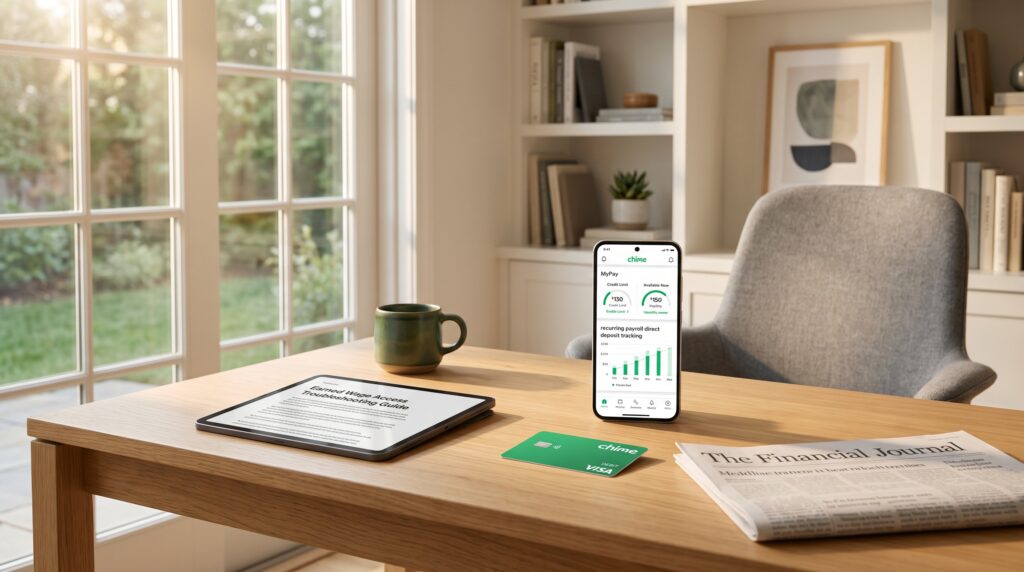
Before troubleshooting a Chime MyPay limit drop, identify which number changed. The credit limit is the maximum amount available within a pay period. “Available now” is the portion of that limit you can access on a particular day.
Chime explains in its official MyPay overview that “Available now” generally begins at $0 after a qualifying direct deposit and may increase daily until it reaches the credit limit. Any advance already taken reduces the available amount. When the next qualifying deposit arrives, the available amount resets and the Chime MyPay limit is recalculated.
| Number in the app | What it means | Why it may look lower |
|---|---|---|
| Credit limit | Maximum accessible in one pay period | Recalculated after income or account changes |
| Available now | Amount accessible on that day | Reset after payday or reduced by advances |
| Outstanding balance | MyPay amount still owed | Awaiting repayment from incoming funds |
| Advance amount | Amount selected for one transfer | Cannot exceed Available now |
This distinction prevents a common misunderstanding. If the limit still shows $300 but Available now shows $40, the Chime MyPay limit itself may not have changed. You may simply be early in a new pay period or have already used part of the available amount.
Why Did the Chime MyPay Limit Drop?
The Chime MyPay limit depends on more than whether a previous advance was repaid. Chime states that qualifying direct deposit activity, bank account activity, internal risk-based criteria, and employment information may be considered. The importance of each factor can change as new information enters the account.
1. Your Qualifying Direct Deposit Was Smaller
A smaller paycheck is one of the clearest reasons for a Chime MyPay limit decrease. Overtime ending, fewer scheduled hours, unpaid time off, reduced gig income, or payroll deductions can lower the net deposit. Even a temporary change may affect the next Chime MyPay limit calculation.
The system evaluates deposits actually recognized as qualifying income rather than the salary you expect to earn. A normal paycheck returning may support a later recalculation, but an immediate restoration is not guaranteed. Avoid moving money between accounts to imitate payroll because ordinary transfers do not become qualifying direct deposits.
2. Your Deposit Arrived Late or the Pay Schedule Changed
The Chime MyPay limit can respond to deposit timing and consistency. A holiday, payroll processing error, employer change, or new pay schedule may make a regular deposit appear late. The system may have less certainty about the current pay cycle until the deposit arrives and is classified.
If payday has only shifted by a day, wait for payroll to complete before assuming the Chime MyPay limit reduction is permanent. Check the transaction description after the money posts. Chime support cannot make an employer release payroll early, so contact the payroll department when the deposit itself is missing.
3. The Deposit Did Not Qualify as Payroll or Eligible Income
Not every incoming payment supports the Chime MyPay limit. Bank transfers, person-to-person payments, trial deposits, and transfers between your own accounts generally are not treated like qualifying payroll or benefits deposits. A large transfer may raise the checking balance without satisfying MyPay’s income requirement.
Look at the source and transaction label rather than the amount alone. If an employer changed its payroll processor, a legitimate deposit may be classified differently until the system recognizes the new pattern. Chime says deposit classification is automated, so agents may be unable to manually convert an ordinary transfer into a qualifying deposit.
4. Your New Pay Period Reset Available Now
Many apparent Chime MyPay limit drops are ordinary resets. After a qualifying direct deposit begins a new pay period, Available now generally returns to $0 and then may rise over time. This can happen even when the displayed Chime MyPay limit stays unchanged.
Compare both numbers in the MyPay tile. If the credit limit remains the same and only Available now fell, there may be nothing to repair. The amount you can access today can grow without the Chime MyPay limit being recalculated upward.
5. You Already Took a MyPay Advance
An advance reduces the remaining amount available in the current period. For example, if Available now reached $180 and you took $100, the remaining figure may fall by that amount. That Chime MyPay limit change is expected and does not necessarily represent a negative eligibility decision.
Check the MyPay activity and outstanding balance before reporting a Chime MyPay limit error. Multiple smaller advances can make the remaining balance harder to track at a glance. Add the advances together and compare them with the earlier available figure.
6. An Outstanding Balance Was Not Fully Repaid
If an expected deposit arrives late or does not cover the balance, access may be temporarily limited. Chime may use incoming funds according to the applicable MyPay agreement, and the account must still meet eligibility requirements afterward. A partial repayment does not necessarily begin a fresh full Chime MyPay limit.
Review the repayment status, expected pay date, and recent deposits. If the app shows a balance you believe was already paid, keep the transaction date and amount ready for support. Do not send a second manual payment without confirming where the first one was applied.
7. Other Chime Obligations Affected the Calculation
Other account obligations may influence the Chime MyPay limit available to you. Chime’s help material says an Instant Loan payment can be part of the Available now calculation, along with MyPay and SpotMe activity. An overdue Instant Loan may also affect access to certain features.
Open each product tile and confirm whether any payment is scheduled, pending, or overdue. Paying an obligation can resolve the outstanding status, but it does not guarantee the old Chime MyPay limit will instantly return. The next offer still depends on the new overall calculation.
8. Your Account or Employment Information Changed
The Chime MyPay limit may change after updates to your address, employer, work email, connected payroll information, or account activity. Removing optional employment data can leave the calculation with fewer current signals. Moving to a state where MyPay is unavailable can affect access entirely.
Confirm that your profile contains accurate, current information. Do not invent an employer, inflate income, or enter someone else’s work details to influence the offer. Incorrect information can complicate eligibility reviews and account recovery.
9. Chime Recalculated Risk-Based Criteria
Sometimes a Chime MyPay limit changes even though no single visible event explains it. Chime uses internal risk-based criteria along with deposits and account behavior, and those criteria are not fully disclosed. The calculation can therefore increase, decrease, or remain the same from one pay period to another.
This does not mean support is hiding an adjustable button. Financial providers typically restrict detailed explanations of risk systems so they cannot be manipulated. Support may confirm whether the account meets the published requirements, but it may not override or explain every automated factor.
How to Respond When Your Chime MyPay Limit Drops
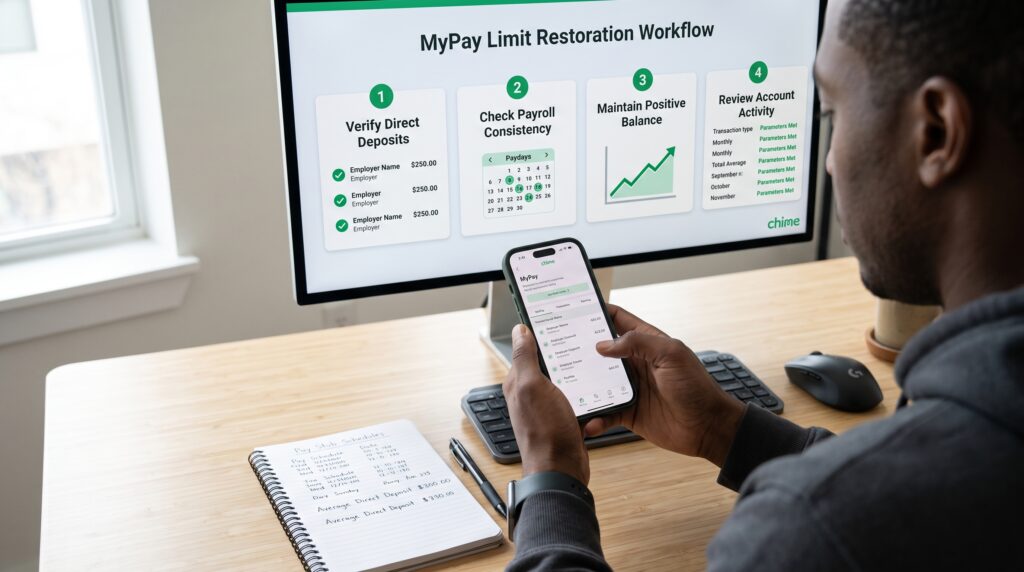
Use the following steps to separate a temporary reset from a genuine limit reduction. Work through them once in order rather than making several account changes simultaneously.
1. Compare Credit Limit and Available Now
Open the MyPay tile and record both values. If only Available now dropped after payday, the change likely reflects the normal pay-cycle reset. If the credit limit itself is smaller, continue checking income and account factors.
Taking a private screenshot can help you compare the numbers later, but protect all identifying details. Never post a balance, account number, or direct deposit record publicly. A support representative can review the account without you sharing sensitive information on social media.
2. Review the Latest Qualifying Direct Deposit
Compare the latest deposit with several earlier paychecks. Look at the amount, payer name, transaction description, posting date, and spacing between deposits. A clear change in any of these details may explain the lower Chime MyPay limit.
If the payment is late, contact the employer or benefits provider first. Chime can only post funds after receiving the payment information. If the deposit posted but appears mislabeled, ask support whether it was recognized as qualifying income.
3. Check the Current Pay-Period Timeline
Determine whether the new pay period has just started. Available now may be low immediately after the qualifying deposit and then increase daily. Waiting for that normal progression is different from waiting for the credit limit itself to rise.
Do not schedule essential expenses based on a possible future increase. The Chime MyPay limit and daily available amount can change, and neither should be treated as guaranteed wages. Plan around money already deposited whenever possible.
4. Confirm Repayment and Outstanding Balances
Review MyPay history and confirm how the last advance was repaid. Then check whether SpotMe, an Instant Loan, or another Chime product shows an amount due. A pending or failed payment may affect what is currently available.
Keep transaction records if the balance appears incorrect. Contact in-app support before attempting duplicate repayment. A completed repayment can restore good standing, but the Chime MyPay limit may still be recalculated rather than returning to its prior amount.
5. Verify Account and Employment Details
Check the address, phone number, email, employer information, and any connected data source in the app. Correct only information that is genuinely outdated or inaccurate. Avoid repeatedly disconnecting and reconnecting services because it can interrupt access to current data.
Members using an eligible external account should also check whether the Plaid connection and linked debit card remain active. An expired connection, frozen card, or mismatched account can pause eligibility. Follow only the official reconnection prompts displayed in Chime.
6. Update the Chime App
Install the latest Chime version from Apple’s App Store or Google Play, then restart the device. An old app can display stale information or fail to refresh a recalculated offer. Also confirm that the phone has a stable connection and automatic date and time.
Updating can fix a display problem, but it cannot force a higher Chime MyPay limit. Avoid modified apps or websites promising to unlock a hidden maximum. Such tools cannot legitimately change Chime’s account-level decision.
7. Allow the Next Qualifying Deposit to Post
If the latest paycheck was unusual, the next consistent qualifying deposit may give Chime newer income information. According to Chime’s official credit-limit explanation, the credit limit is recalculated when a qualifying direct deposit arrives. That means the next pay cycle is often more relevant than repeated app refreshes.
There is still no guaranteed increase. A deposit can trigger a new calculation that raises, lowers, or preserves the Chime MyPay limit. Use the time to correct genuine payroll issues rather than attempting artificial transfers.
8. Contact Chime Support With Specific Details
If the numbers do not match the activity you see, open Chime and use in-app support. Explain whether the credit limit or Available now changed, when it happened, and whether a qualifying deposit or repayment recently posted. Precise facts are more useful than simply asking for the old amount back.
Ask whether the account is missing a qualifying deposit, has an outstanding balance, or needs updated information. Support may correct a technical or account-data issue but cannot guarantee a manual increase. Never share a password, full card number, or one-time verification code.
Chime MyPay Limit Troubleshooting Table
| What you see | Most likely explanation | What to check |
| Available now is $0 after payday | New pay-period reset | Credit limit and deposit date |
| Both numbers are lower | Limit recalculation | Deposit amount, history, and account activity |
| MyPay tile is unavailable | Eligibility or account issue | State, qualifying deposits, and standing |
| Deposit arrived but amount stayed low | Deposit may not qualify or review is pending | Payer and transaction description |
| Amount fell after an advance | Advance deducted from Available now | MyPay activity history |
| Balance remains after payday | Deposit did not fully repay it | Posted amount and repayment status |
| External-account access stopped | Plaid link or debit card issue | Connection and card validity |
The table identifies the best starting point, not a guaranteed diagnosis. Two members can see the same Chime MyPay limit change for different reasons. Use the in-app message and your own transaction history together.
Common Mistakes After a MyPay Limit Decrease
Moving Money Around to Simulate Income
Transfers from another bank or payment app generally do not become qualifying payroll. Moving the same funds between accounts will not create a dependable income history. It may also make transactions harder to understand during troubleshooting.
Applying Again Immediately
The Chime MyPay limit is calculated by the system rather than negotiated through repeated applications. Refreshing, reinstalling, or contacting several agents cannot guarantee a different result. Wait for real account information, such as the next qualifying deposit, to update.
Confusing Repayment With Guaranteed Restoration
Repaying an advance resolves that balance, but it does not lock in the previous offer. Chime can recalculate the next amount using current information. Treat every displayed limit as variable rather than permanent.
Relying on MyPay for Essential Bills
Because a Chime MyPay limit can change, it is risky to promise that amount toward rent, utilities, or another fixed expense before it is available. Build the budget using deposited funds first. An advance is better treated as temporary flexibility, not recurring salary.
Paying Someone to Increase the Limit
No outside agent can unlock a secret MyPay tier. A person asking for money, login codes, or remote phone access is creating a security risk. Use only Chime’s official app and support channels.
Pro Tips for More Predictable MyPay Access
- Keep qualifying direct deposits consistent when your employer allows it.
- Review payroll changes before the next pay cycle begins.
- Distinguish the Chime MyPay limit from Available now every time.
- Track advances so the remaining amount is easy to understand.
- Keep account and employment details accurate and current.
- Address outstanding balances through official Chime options.
- Never spend based on an increase that has not appeared in the app.
These habits do not guarantee a higher offer. They reduce avoidable interruptions and make a Chime MyPay limit change easier to explain. Chime still controls eligibility and the final amount.

Frequently Asked Questions
Why Did My Chime MyPay Limit Drop After Repayment?
Repayment clears the previous balance but does not guarantee the same future limit. A new qualifying direct deposit can trigger recalculation using current deposit activity, account activity, employment data, and risk-based criteria. The next Chime MyPay limit may therefore be higher, lower, or unchanged.
Why Is Available Now $0 When I Still Have a Credit Limit?
Available now generally resets to $0 at the start of a new pay period after a qualifying direct deposit. It may then increase daily toward the credit limit. An outstanding balance or advances already taken can also reduce it.
Can Chime Support Manually Raise My MyPay Limit?
Support can investigate missing deposits, incorrect balances, app errors, and eligibility messages. It generally cannot promise a manual Chime MyPay limit increase or override undisclosed risk criteria. Ask for the reason category and next valid action instead.
Does a Late Direct Deposit Lower MyPay?
A late deposit can temporarily affect income timing, repayment, and eligibility. Once the qualifying deposit arrives, the account can be reassessed, but the prior offer is not guaranteed. Contact the payer if Chime has not yet received the deposit.
Does Taking an Advance Lower the Credit Limit?
Taking an advance directly lowers Available now because the amount is deducted from what you can access during that period. It does not necessarily reduce the underlying credit limit. Compare both figures to see which one changed.
How Often Does the Chime MyPay Limit Change?
Chime says the credit limit is recalculated when a qualifying direct deposit arrives. Other eligibility reviews may also occur as account or income information changes. There is no promise that every review produces a different number.
Will a Bigger Paycheck Increase MyPay Immediately?
A larger qualifying deposit may support a future increase, but it does not guarantee one. The Chime MyPay limit uses several factors rather than a simple percentage of one paycheck. Wait for the app to display the recalculated amount.
Can Transfers From Cash App or Venmo Increase MyPay?
Person-to-person transfers generally do not count as qualifying direct deposits for standard MyPay eligibility. They may add funds to an account without building the payroll history used for the feature. Do not move money solely to imitate income.
Can Someone Under 18 Use MyPay?
No. Chime’s published MyPay eligibility requirements state that a member must be at least 18. A younger user should not enter a false age or use another person’s account information to access the product.
Conclusion
A Chime MyPay limit drop usually comes from a new pay-cycle calculation, changed qualifying deposits, account activity, repayment status, employment data, another obligation, or internal risk criteria. The first step is always confirming whether the actual credit limit fell or Available now simply reset.
Review the latest qualifying deposit, pay schedule, advances, balances, and profile information. Correct real errors and give new deposits time to post, but avoid transfers or false details intended to influence the calculation. No method can guarantee the old offer will return.
If the Chime MyPay limit still appears inconsistent with the account, contact official in-app support with exact dates and amounts. Support may identify missing data or a technical issue, while the final credit decision remains subject to Chime’s eligibility rules and recalculation.
Key Takeaways
- The Chime MyPay limit is recalculated and is not guaranteed to remain unchanged.
- “Available now” can reset to $0 after payday without the credit limit being reduced.
- Direct deposit amount, timing, history, account activity, and risk-based criteria can affect the Chime MyPay limit.
- An advance already taken is deducted from the amount currently available.
- Chime support can explain account messages but generally cannot manually promise a higher Chime MyPay limit.
Leave a Reply