
Introduction
You enter your details, Cash App appears to accept them, and then the same verification message returns. Sometimes the prompt reappears immediately; other times it comes back when you try to send money, add cash, order a card, or use another feature. Either way, the Cash App verification required loop can make a usable account feel completely stuck.
The Cash App verification required loop does not always mean your information is wrong or your account has been closed. A profile mismatch, blurry document image, unfinished submission, outdated app, network interruption, or security review can all produce similar symptoms.
There is no safe or legitimate trick for bypassing identity verification. Use your own accurate information and only submit documents Cash App officially requests. If the account holder is 13–17, the correct route is an eligible sponsored account authorized by a parent or legal guardian, not entering a false birth date.
This guide explains how to diagnose the Cash App verification required loop, apply legitimate fixes, and contact official support when necessary.
Quick Answer
To fix the Cash App verification required loop, stop submitting the form repeatedly and identify the exact screen that returns. Confirm that your legal name, date of birth, address, and requested Social Security information match official records; then update Cash App, use a stable connection, enable camera permissions, and resubmit a clear image of an unexpired ID if requested.
If you are 13–17, ask a parent or legal guardian to complete the official sponsorship process. If the Cash App verification required loop returns, contact in-app Support with the error wording and steps already completed.
Table of Contents
What Is the Cash App Verification Required Loop?
The Cash App verification required loop happens when the app asks you to verify your identity, you complete one or more prompts, and the app sends you back to the same request. It may look like the submission was ignored, even though Cash App received part of the information. In some cases, only a particular feature triggers the repeated screen.
Cash App limits access for customers who have not completed the identity process. According to its official customer identity verification documentation, the platform may ask for a legal name, date of birth, and the last four digits of a Social Security number, with additional information or an unexpired government-issued photo ID requested in some cases.
The Cash App verification required loop cannot simply be dismissed permanently. It repeats when required information is missing, unreadable, or still under review.
Why Does Cash App Keep Asking for Verification?
A Cash App verification required loop can begin for several reasons, and the displayed message may not identify the specific one. Note whether the Cash App verification required loop appears during sign-in, after entering personal details, while scanning an ID, or only when opening one feature. That detail separates a technical problem from an eligibility issue.
| Likely cause | What you may notice | Best first action |
|---|---|---|
| Personal details do not match | Form returns after name, birth date, or SSN entry | Compare every field with official records |
| Document image is unreadable | ID upload repeats or fails | Retake the image in bright, even light |
| Submission is still under review | No new field appears, but access stays limited | Avoid repeated submissions and check later |
| App or connection error | Screen freezes, reloads, or loses progress | Update the app and switch networks |
| Camera permission is blocked | Scanner is black or will not capture | Enable camera access in phone settings |
| Sponsored account is incomplete | A 13–17 account cannot transact | Complete parent or guardian authorization |
| Security review is active | Several features become unavailable | Contact official in-app Support |
The Cash App verification required loop may not identify the problem field because security-review details are limited. Work through the fixes rather than guessing at new information.

How to Fix Cash App Verification Required Loop
Before changing anything, privately save the error wording. Never post a Social Security number, ID number, barcode, or sign-in code. Then follow these nine steps.
1. Stop Repeating the Same Submission
When the Cash App verification required loop appears, repeatedly tapping Submit can create more confusion. You may not know whether the first attempt is pending, whether the connection failed, or whether later attempts replaced it. Close the verification screen and wait a short period before trying once more.
Note the exact message, the action that caused it, and whether any notification acknowledged the submission. These details make support conversations more precise.
Avoid changing several profile fields at once. Make only corrections supported by your real records.
2. Match Every Personal Detail to Official Records
The most important fix for a Cash App verification required loop is checking that every requested detail is accurate. Enter your full legal name rather than a nickname, social handle, shortened surname, or business name unless the form specifically asks for something else. Check spelling, spacing, suffixes, and the order of names.
Confirm the birth date and requested Social Security digits before submitting. Cash App may compare your name, date of birth, and SSN information with official records, so a typing error can trigger the Cash App verification required loop. Never test random numbers or another person’s information.
Your current residential address should be complete. A recent move or legal name change may require additional documentation, so contact Support if the app provides no way to explain it.
3. Use the Correct Sponsored-Account Process for Ages 13–17
For a customer between 13 and 17, the Cash App verification required loop may mean the account still needs sponsorship. The account should be authorized through Cash App’s official flow by an eligible parent or legal guardian. Some features may remain unavailable until that process is completed.
Do not change the birth year to make the customer appear 18 or use an adult’s identity as if it belongs to the teen. False information can trigger the Cash App verification required loop and lead to restrictions. It also makes future account recovery harder because the details will not identify the real user.
The parent or guardian should review the sponsorship request inside their own account. If it repeatedly fails, contact in-app Support without exchanging login credentials.
4. Update Cash App and Restart the Device
An outdated app can preserve the Cash App verification required loop after the account status changes. Open Apple’s App Store or Google Play, locate the official Cash App listing, and install any update. Do not download an “unlocked,” modified, or separately provided file.
After updating, close Cash App and restart the phone. Sign in normally and check whether the Cash App verification required loop returns.
Set the phone’s date, time, and time zone automatically because incorrect time can interfere with secure sessions. Install any pending system update when practical.
5. Use a Stable, Private Internet Connection
Identity forms and document images must upload completely. If cellular service drops or public Wi-Fi interrupts the secure session, the final confirmation may never reach the server. The app can then return you to the beginning without explaining the failed upload.
Switch from unstable Wi-Fi to a trusted home network or reliable mobile data, then retry once. Temporarily disable a VPN or network-level content filter if it is breaking the connection, but do not turn off normal device security. Avoid submitting sensitive identity information over open public Wi-Fi.
If the Cash App verification required loop happens on both Wi-Fi and mobile data, move to the next step.
6. Enable Camera and Photo Permissions
If Cash App requests an ID image or selfie, it needs access to the camera and, in some workflows, selected photos. Open the phone’s privacy settings, find Cash App, and confirm that camera permission is enabled. Then check whether the Cash App verification required loop clears.
A black preview, frozen shutter, or instant return often points to blocked permission. On a managed device, its owner or administrator may need to allow camera access.
Grant only the permissions needed for the task. The Cash App verification required loop should not require installing remote-control software, sharing the screen with a stranger, or allowing an unknown person to operate the phone.
7. Retake the ID Image Carefully
An identity document may be correct but still fail because the image cannot be read. Place the unexpired, government-issued ID requested by the app on a plain surface in bright, even lighting. Capture the entire document with all four edges visible, avoiding glare, shadows, fingers, blur, and cropped text.
Clean the lens and hold the phone steady. Do not edit, filter, cover, or screenshot the document image; altered or low-detail images may be rejected.
Check that the document is current and matches the account. If the Cash App verification required loop returns after one careful resubmission, ask Support whether another document or manual review is required.
8. Check Account Access and Security
The Cash App verification required loop can also follow a new-device sign-in, changed phone number, unusual activity, or account-recovery attempt. Confirm that the profile’s email address and phone number are yours and still accessible. Review recent activity for anything unfamiliar.
If you see an unfamiliar payment, sign-in, or profile change, stop the routine troubleshooting and contact official Support. Secure the email account and mobile number associated with Cash App as well. Someone who controls either channel may be able to interfere with account recovery.
Cash App’s official security guidance says its representatives will not ask for your PIN or sign-in code. Anyone offering to remove the Cash App verification required loop for a code, payment, or remote access is not legitimate.
9. Contact Cash App Through Official Support
If every detail is accurate and the Cash App verification required loop remains, the account may need review by Cash App. In the app, open your profile, choose Support, and use the available chat option. You can also reach the help section from Cash App’s official website rather than relying on a number found in a comment or advertisement.
Send the exact error, when it started, where it appears, your device and app version, and completed steps. Mention recent legitimate account changes, but never include a password, PIN, sign-in code, or full card number.
Ask whether the submission is incomplete, pending, rejected, or awaiting documentation. Support cannot guarantee approval, but it can identify the next permitted action.
Before contacting Support, confirm notifications are enabled and check the email address linked to the account. A response may arrive outside the app, and missing that update can make a completed review seem stuck for much longer.
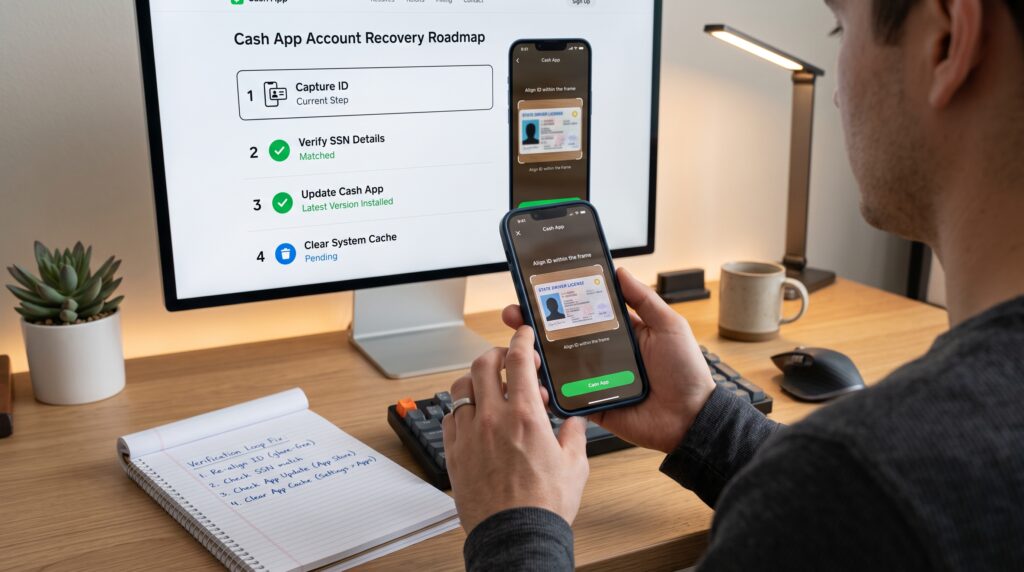
Troubleshooting the ID Scan
When the Cash App verification required loop starts during document capture, the image itself deserves a separate check. Use this table before taking another photo.
| Scan problem | Why it fails | Better approach |
| Bright glare covers text | Details cannot be read | Move away from direct overhead light |
| One edge is cropped | Document cannot be fully evaluated | Leave space around all four edges |
| Image is blurry | Text and security features lose detail | Clean the lens and steady the phone |
| ID is expired | Document may not meet requirements | Use a currently valid requested ID |
| Account name differs | Automated records may not match | Correct legitimate profile details or contact Support |
| Edited or filtered photo | Image may appear altered | Submit a fresh, unedited capture |
Submit documents only through a verified workflow you opened yourself, never an address sent by an unsolicited caller. If the scanner is broken, ask Support for the secure submission option.
Common Mistakes That Keep the Loop Going
Guessing Which Information Cash App Wants
The Cash App verification required loop is not solved by trying different birthdays, spellings, or SSN digits. Each attempt should use the same truthful details that appear in your records. If those records changed, explain the legitimate change to Support instead of improvising.
Submitting Too Many Attempts
Rapid retries can produce overlapping confirmations or temporary security checks. Make one careful submission and allow time for processing. If no status appears, ask Support whether the request is pending before sending it again.
Trusting Unofficial “Verification Agents”
Search results and social-media replies may advertise instant manual verification. These offers often aim to steal login information, documents, or money. Fixing the Cash App verification required loop never requires sending a stranger a fee or transfer.
Opening Another Account
A new profile does not correct the data or document issue affecting the first profile. It may leave balances, payments, and contact details split across accounts. Resolve the original Cash App verification required loop through official support unless Cash App specifically instructs you otherwise.
Pro Tips for a Smoother Verification Review
- Gather the requested, unexpired document before opening the verification screen.
- Enter details exactly as they appear on official records, including suffixes where relevant.
- Use bright indirect light and a plain background for document images.
- Keep the app open until the upload or confirmation finishes.
- Save the date and wording of each submission, but keep screenshots private.
- Use only the app, official app-store listing, and official Cash App website.
- Contact Support once with a complete explanation rather than opening many tickets.
These steps reduce preventable errors and give Support a clean history if the Cash App verification required loop needs manual attention.
Frequently Asked Questions
Can I Bypass the Cash App Verification Required Loop?
No legitimate method bypasses the Cash App verification required loop. Modified apps, fake details, borrowed identities, and paid “unlock” services can expose your information or restrict the account. Complete the official process or ask Cash App which requirement remains unfinished.
Why Does Cash App Ask for My SSN?
Financial platforms use identity information to meet legal and security obligations and to determine access to regulated features. Cash App may initially request the last four digits and, in some cases, additional identity information. Enter it only inside the official app or a verified Cash App page you opened yourself.
Why Does the Loop Return After I Upload My ID?
The document may be unreadable, expired, incomplete, still under review, or inconsistent with profile details. Retake one clear, unedited image and verify the account information. If the Cash App verification required loop returns again, ask official Support whether a manual review or different document is needed.
Can I Verify Cash App Without an ID?
Cash App determines what information or documentation is required for each review. Some checks may begin with personal details, while others request a government-issued photo ID or more information. If the app specifically requires a document, there is no responsible workaround for skipping it.
What If My Legal Name Recently Changed?
Use the accurate current name and be prepared to provide officially requested evidence of the change. Do not alternate between old and new names across repeated attempts. Contact in-app Support if the profile cannot be corrected or if existing records have not yet updated.
Can a Teen Fix the Verification Loop?
A customer ages 13–17 should use Cash App’s eligible sponsored-account process with a parent or legal guardian. The sponsor may need to verify their own identity and approve the account. Entering a false adult birth date is not a valid fix for the Cash App verification required loop.
Should I Delete and Reinstall Cash App?
Reinstalling may help a damaged app installation, but first confirm you can still access the phone number or email used to sign in. Update, restart, and test the connection before reinstalling. Never download the replacement app from a link sent by an unknown person.
How Do I Know a Cash App Support Message Is Real?
Start the conversation from the app’s Support menu or official website. Do not share your PIN, password, or sign-in code, and never send a “test payment” to fix the Cash App verification required loop. Leave if someone requests remote access or pressures you to act immediately.
Will Making a New Account Fix the Problem?
Usually not. A second account can repeat the Cash App verification required loop and make ownership harder to explain. Keep the original account and ask official Support for the next valid step unless Cash App says otherwise.

Conclusion
The Cash App verification required loop usually has a specific cause even when the app shows a general message. Accurate personal details, a clear unexpired document, correct permissions, a current app version, reliable internet, and the proper sponsored-account process address the most common problems.
Work through the fixes once and record what happened. Do not use false information, duplicate profiles, unofficial apps, or strangers promising instant approval. Those shortcuts can turn the Cash App verification required loop into an account-security problem.
If the Cash App verification required loop continues after careful troubleshooting, open in-app Support and request the status of the verification submission. A precise report gives the official team the best chance of identifying the missing step while keeping your identity and account protected.
Key Takeaways
- A Cash App verification required loop is commonly caused by mismatched personal information, an incomplete check, an unreadable ID, an app or network problem, or an account review.
- Verification cannot be safely bypassed; inaccurate details can delay the review or restrict the account.
- Customers ages 13–17 need the appropriate parent- or guardian-sponsored account process.
- Never send a PIN, password, or sign-in code to someone claiming they can manually verify the account.
- If the Cash App verification required loop continues after legitimate troubleshooting, use in-app Support instead of creating another account.
Leave a Reply