
Apple Cash Account Restricted
Seeing an Apple Cash account restricted message can be frustrating, especially when you need to send money, receive payments, or make purchases using your Apple Cash balance. In many cases, the restriction appears unexpectedly, leaving users unsure whether it’s a temporary security measure or a more serious account issue.
The good news is that an Apple Cash account restricted status doesn’t always mean your account has been permanently locked. Apple may temporarily restrict certain features while reviewing your account, verifying your identity, or investigating unusual activity. Once the required information has been provided or the review is complete, many restrictions can be removed.
Understanding why your account was restricted is the first step toward restoring full access. Instead of trying random solutions, it’s better to identify the specific reason behind the restriction so you can resolve it more efficiently.
In this guide, you’ll learn why an Apple Cash account restricted message appears, what it means, and nine proven ways to unlock your account and prevent similar issues in the future.
Quick Answer
If your Apple Cash account restricted message appears, start by opening the Wallet app and checking for any notifications requesting identity verification or additional account information. Confirm that your Apple ID details are accurate, complete any pending verification requests, and review any emails or messages from Apple regarding your account. In many cases, completing these steps is enough to restore full access.
Table of Contents
What Does an Apple Cash Account Restricted Message Mean?
Short Answer: An Apple Cash account restricted message means Apple has temporarily limited your ability to use some or all Apple Cash features while it verifies your identity, reviews recent account activity, or completes required compliance checks. In most cases, the restriction is temporary and can be removed after the necessary review or verification is completed.
An Apple Cash account restricted notification means Apple has temporarily limited some or all of your Apple Cash features. Depending on the reason for the restriction, you may be unable to send money, receive payments, add funds, transfer your balance to a bank account, or use Apple Cash for purchases. This type of restriction is different from deleting your Apple Cash account or permanently closing it. In many situations, the limitation remains in place only until Apple completes a security review or you provide the requested information.
Although the restriction can interrupt your ability to use Apple Cash, your account usually remains accessible through the Wallet app, allowing you to review notifications and complete any required verification steps.
Why Apple Cash Accounts Become Restricted
Short Answer: Apple may display an Apple Cash account restricted message because your account needs identity verification, contains outdated information, has unusual transaction activity, or is undergoing a routine security or compliance review. Reviewing your Wallet notifications usually helps identify the exact cause.
There are several reasons why an Apple Cash account restricted message may appear. One of the most common causes is incomplete identity verification. Because Apple Cash is a regulated financial service, users may occasionally be asked to verify their identity before they can continue using certain features. If the requested information hasn’t been provided, Apple may temporarily restrict the account until the verification process is complete.
Restrictions can also occur if Apple detects unusual account activity, receives reports of suspicious transactions, identifies inconsistencies in your account information, or needs additional documentation to comply with financial regulations. In some cases, the restriction is simply a precaution while Apple reviews recent activity. Understanding the reason behind the restriction makes it much easier to choose the correct solution.
Before You Start Troubleshooting
Before attempting to unlock an Apple Cash account restricted status, spend a few minutes reviewing your account information.
Open the Wallet app and check for alerts related to Apple Cash. Then confirm that your Apple ID information, phone number, email address, and billing details are current and accurate. If you’ve recently changed devices, updated your Apple ID, or modified your personal information, make sure those changes have been fully synchronized across your Apple account.
It’s also a good idea to check your email for messages from Apple, as they may explain why the restriction was placed on your account and what steps are required to remove it.

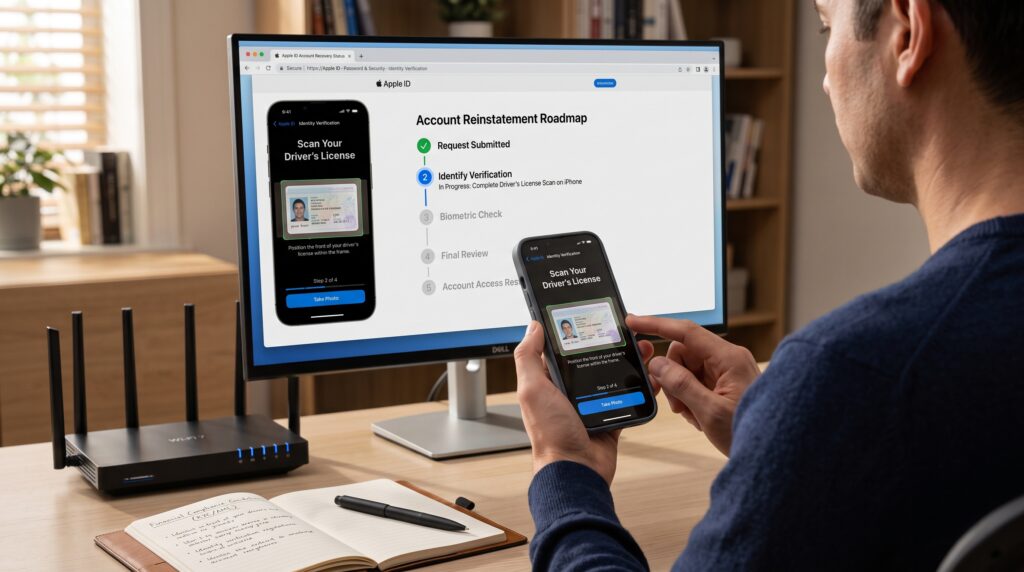
Fix 1: Complete Identity Verification
Incomplete identity verification is one of the most common reasons for an Apple Cash account restricted message.
If Apple requests additional personal information or identification documents, complete the verification process as soon as possible. Depending on your situation, you may be asked to confirm your legal name, date of birth, address, or provide a government-issued ID.
Submitting accurate information promptly helps Apple complete its review and may restore your Apple Cash features more quickly.
Fix 2: Review Your Apple ID Information
Your Apple Cash account is closely connected to your Apple ID, so inaccurate account details can sometimes lead to restrictions.
Review your Apple ID settings and confirm that your personal information is accurate and consistent across your devices. If you’ve recently changed your name, phone number, email address, or billing information, update any outdated details before attempting to use Apple Cash again.
Keeping your account information current helps reduce verification issues and may resolve an Apple Cash account restricted notification if inconsistent account details triggered the review.
Fix 3: Check for Notifications in the Wallet App
Many users overlook the Wallet app when trying to resolve an Apple Cash account restricted message.
Open the Wallet app, select your Apple Cash card, and review any notifications or instructions that appear. Apple often explains whether additional verification, updated information, or another action is required before the restriction can be removed.
Following the guidance provided within the Wallet app is often much more effective than guessing why the restriction occurred or attempting solutions that don’t address the actual problem.
Comparison Table
| Fix | When It Helps |
|---|---|
| Complete identity verification | Verification is pending |
| Review Apple ID information | Account details are outdated |
| Check Wallet app notifications | Apple has requested additional action |
These first three solutions resolve many cases where an Apple Cash account restricted message appears unexpectedly. In the next section, we’ll cover additional fixes, including account reviews, device security, Apple Support, and other situations that may prevent you from using Apple Cash normally.
Fix 4: Update Your iPhone and Wallet Settings
Software issues can occasionally contribute to an Apple Cash account restricted message, particularly if your device hasn’t been updated in a while. Keeping iOS and the Wallet app up to date ensures your device has the latest security improvements and compatibility updates.
Open Settings > General > Software Update and install any available updates. After your iPhone restarts, open the Wallet app again and check whether the restriction is still present. If Apple recently made changes to Apple Cash or its verification process, updating your device may resolve issues caused by outdated software.
Fix 5: Verify Your Linked Payment Methods
Your linked debit card or bank account plays an important role in how Apple Cash works. If the payment method has expired, been removed, or contains incorrect information, Apple may limit certain Apple Cash features until the issue is resolved.
Review the payment methods connected to your Apple ID and Apple Wallet to make sure they’re still active and accurate. If you’ve recently received a replacement debit card or changed banks, update your information before trying to use Apple Cash again. Keeping your payment details current can prevent unnecessary delays while Apple reviews your account.
Fix 6: Check for Unusual Account Activity
Apple continuously monitors accounts for activity that could indicate unauthorized access or fraud. If the system detects something unusual—such as sign-ins from unfamiliar devices, unexpected payment attempts, or activity that differs significantly from your normal usage—it may temporarily display an Apple Cash account restricted message while the account is reviewed.
Take a few minutes to review your recent Apple Cash transactions and Apple ID security settings. If you notice activity you don’t recognize, change your Apple ID password immediately and remove any devices that shouldn’t have access to your account. Securing your account can help prevent additional restrictions and protect your funds.
Fix 7: Respond to Apple’s Verification Requests
Sometimes Apple needs additional information before restoring full access to Apple Cash. If you’ve received an email, Wallet notification, or message asking you to verify your identity or confirm account information, respond as soon as possible.
Delaying these requests can extend the review period, while providing complete and accurate information often helps Apple process your account more efficiently. Before submitting any documents, double-check that they’re clear, current, and match the personal information associated with your Apple ID.
Fix 8: Contact Apple Support
If you’ve completed every verification request and your Apple Cash account restricted message still hasn’t disappeared, contacting Apple Support is the next step.
Before reaching out, gather any information that may help explain the issue, including screenshots of the restriction message, recent emails from Apple, and details about any verification steps you’ve already completed. Providing this information at the beginning of the conversation can help the support team investigate your account more efficiently and determine whether additional action is required.
Fix 9: Wait for the Review to Finish
In some situations, there isn’t an immediate action you can take because Apple is actively reviewing your account. Once you’ve submitted the requested information and confirmed that your account details are accurate, the best approach is often to allow the review process to finish.
Checking the Wallet app periodically for updates is perfectly reasonable, but repeatedly changing your account information or submitting duplicate verification requests usually won’t speed up the review. If Apple needs additional documentation, you’ll normally receive a notification explaining exactly what’s required.
How Long Does It Take to Remove the Restriction?
Short Answer: The time needed to remove an Apple Cash account restricted status depends on why the restriction was applied. Simple verification requests may be resolved after your information is reviewed, while more detailed security or compliance checks can take longer before full access is restored.
The amount of time required to remove an Apple Cash account restricted status depends on why the restriction was applied.
Simple verification issues may be resolved relatively quickly after the requested information has been submitted, while more detailed security or compliance reviews can take longer. The timeline also depends on how quickly you respond to Apple’s requests and whether additional documentation is needed. Rather than guessing when your account will be restored, monitor the Wallet app and your email for official updates from Apple regarding the review.
Common Problems and Solutions
Most Apple Cash account restricted issues are related to incomplete verification, outdated account information, security reviews, or unusual account activity. Identifying the exact cause is much more effective than trying every possible solution.
If your account remains restricted after completing the recommended steps, review every notification in the Wallet app and any emails you’ve received from Apple. These messages often explain why the restriction was applied and what you need to do before full access can be restored.
Comparison Table
| Problem | Recommended Solution |
|---|---|
| Identity verification pending | Complete the requested verification |
| Apple ID information is outdated | Update your account details |
| Linked payment method has an issue | Verify or update your bank or debit card |
| Security review in progress | Respond to Apple’s requests and wait for the review |
| Restriction still remains | Contact Apple Support for further assistance |
Although an Apple Cash account restricted message can be inconvenient, most cases are temporary and can be resolved by following Apple’s instructions, keeping your account information accurate, and completing any requested verification without delay.

Frequently Asked Questions
If you’re dealing with an Apple Cash account restricted message, these are some of the most common questions users ask when trying to restore full access to their account.
Why is my Apple Cash account restricted?
An Apple Cash account restricted notification usually appears because Apple needs to verify your identity, review recent account activity, or confirm that your account complies with financial regulations. In some cases, restrictions are triggered by unusual transactions, outdated account information, or pending verification requests.
Can I still use Apple Pay if my Apple Cash account is restricted?
Usually, yes. An Apple Cash restriction doesn’t necessarily affect Apple Pay or the payment cards stored in your Apple Wallet. However, your ability to send money, receive payments, transfer funds, or use your Apple Cash balance may be temporarily limited until the restriction is removed.
How long does it take to remove an Apple Cash restriction?
The time required to remove an Apple Cash account restricted status depends on the reason for the review. If Apple only needs additional verification or updated account information, the restriction may be lifted after the required details have been reviewed. More complex security or compliance reviews can take longer.
Can I unlock my Apple Cash account without contacting Apple?
In many situations, yes. If the Wallet app or Apple sends instructions requesting identity verification or updated account information, completing those steps is often enough to restore access. Contacting Apple Support is usually recommended only if you’ve completed all requested actions and the restriction still hasn’t been removed.
Will creating a new Apple ID fix the problem?
No. Creating another Apple ID generally isn’t a solution for an Apple Cash account restricted message and may create additional account management issues. It’s usually much more effective to resolve the restriction on your existing account by completing Apple’s verification process.
How can I avoid future Apple Cash restrictions?
Keeping your Apple ID information accurate, using trusted devices, monitoring your account for unusual activity, and responding quickly to Apple’s verification requests can reduce the likelihood of future restrictions. Regularly updating your payment information and keeping your iPhone up to date also helps ensure your account continues operating normally.
Final Thoughts
An Apple Cash account restricted message can interrupt your ability to send and receive money, but in most cases it’s a temporary security measure rather than a permanent problem. Apple uses these restrictions to protect users, verify account information, and comply with financial regulations, so understanding the reason behind the restriction is the key to resolving it efficiently.
The best approach is to review your Wallet app, complete any outstanding verification requests, and confirm that your Apple ID, payment methods, and personal information are accurate and up to date. Most restrictions are removed once Apple finishes reviewing the required information and determines that your account can safely resume normal activity.
If the restriction remains after you’ve completed every recommended step, contact Apple Support with details about your account and any verification you’ve already submitted. A systematic approach is far more effective than repeatedly changing account settings or creating a new Apple ID, which usually doesn’t resolve the underlying issue.
Key Takeaways
- An Apple Cash account restricted message is usually temporary.
- Identity verification is one of the most common reasons for account restrictions.
- Review the Wallet app for notifications and follow Apple’s instructions carefully.
- Keep your Apple ID and payment information accurate and up to date.
- Secure your account if you notice unfamiliar devices or suspicious activity.
- Allow time for Apple’s review process after submitting the requested information.
- Contact Apple Support if the restriction continues after completing all verification steps.
Leave a Reply