
Table of Contents
How to Use Apple Cash for In App Purchases
If you’ve ever wondered how to use Apple Cash for in app purchases, you’re not alone. Apple Cash is a convenient way to send, receive, and spend money directly from your Apple Wallet, but many users aren’t sure whether it can also be used for purchases inside their favorite apps.
The good news is that, in many cases, you can use Apple Cash for in app purchases as long as your Apple Cash card is set up correctly and your Apple ID payment settings allow it. Whether you’re buying extra lives in a mobile game, subscribing to a streaming service, or purchasing premium features in an app, Apple Cash can make the payment process quick and secure.
In this guide, you’ll learn everything you need to know about how to use Apple Cash for in app purchases, including the requirements, setup process, troubleshooting tips, and the most common reasons payments may fail.
Quick Answer
Yes, you can use Apple Cash for in app purchases if your Apple Cash account is properly set up and eligible for Apple ID purchases. In most cases, you’ll need to verify your Apple Cash account, have enough available funds, and make sure Apple Cash is selected as a payment method in your Apple ID settings. If Apple Cash isn’t available, your purchase may be charged to another payment method linked to your Apple account.
What Is Apple Cash?
Apple Cash is Apple’s digital payment service that allows users to send and receive money through the Messages app and Apple Wallet. Funds received through Apple Cash are stored on a virtual Apple Cash card, which can be used anywhere Apple Pay is accepted. You can also transfer your Apple Cash balance to a linked bank account or eligible debit card.
Apple Cash is commonly used to:
- Send money to friends and family
- Receive payments instantly
- Shop in stores using Apple Pay
- Make online purchases
- Pay within supported apps
- Transfer money to a bank account
Because it’s integrated into the Apple ecosystem, Apple Cash provides a fast and secure way to manage everyday payments.
Can You Use Apple Cash for In App Purchases?
Yes, in many situations you can use Apple Cash for in app purchases, but there are a few conditions that must be met. Apple Cash works with Apple Pay, and many apps support Apple Pay as a payment option. Additionally, Apple allows eligible users to use their Apple Cash balance for purchases made through their Apple ID, including many apps, games, subscriptions, and digital content.
However, not every app accepts Apple Pay directly, and some developers only support traditional payment methods like credit cards or debit cards. That’s why it’s important to understand how the payment process works before attempting to use Apple Cash for in app purchases.
Requirements Before You Begin
Before you try to use Apple Cash for in app purchases, make sure you meet the following requirements:
- You have an eligible Apple device.
- Apple Cash has been set up in the Wallet app.
- Your Apple Cash account has been verified if required.
- You’re signed in with your Apple ID.
- Two-factor authentication is enabled.
- You have enough money in your Apple Cash balance.
- Your device is running a supported version of iOS or iPadOS.
- Apple Cash is available in your region.
Meeting these requirements helps ensure that payments are processed smoothly.
How to Set Up Apple Cash
If you haven’t activated Apple Cash yet, you’ll need to complete the setup before you can use Apple Cash for in app purchases.
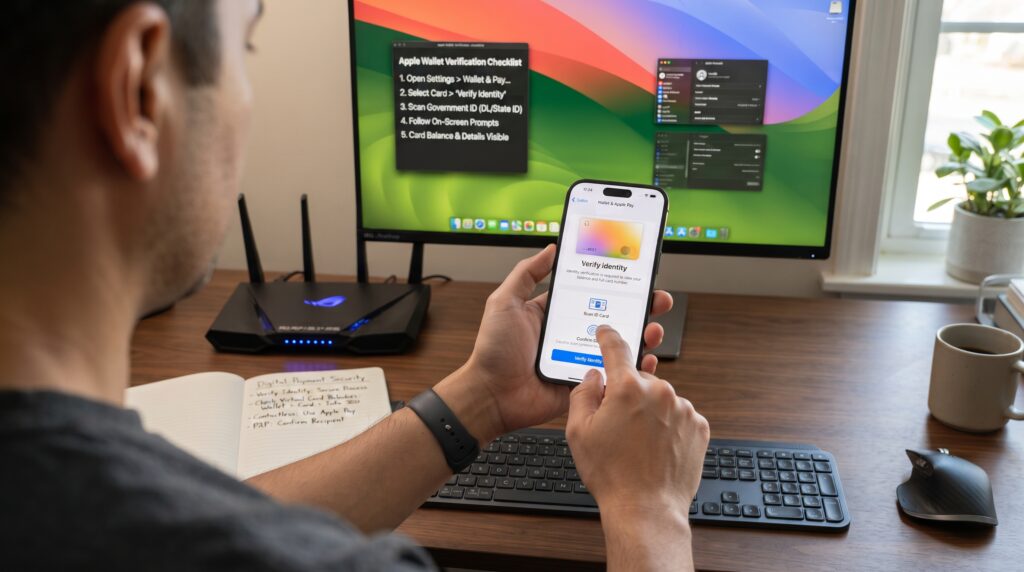
Open the Wallet app on your iPhone and select the Apple Cash card. Follow the on-screen instructions to enable Apple Cash if it’s not already active. Depending on your account status, you may be asked to verify your identity by providing personal information. This verification helps Apple comply with financial regulations and protects your account from unauthorized activity.
Once setup is complete, you can add money to your Apple Cash balance using an eligible debit card or receive money from other Apple Cash users.
How to Use Apple Cash for In App Purchases
Once your Apple Cash account is ready, the process to use Apple Cash for in app purchases is simple.
Begin by opening the app where you want to make a purchase. Navigate to the item, subscription, or premium feature you wish to buy. When you’re ready to check out, choose Apple Pay if it’s available as the payment option. If your Apple Cash balance is eligible and set as your preferred payment source, Apple will automatically use those funds to complete the purchase.
If the app processes payments through your Apple ID instead of Apple Pay, Apple may also use your Apple Cash balance, depending on your payment settings and available funds. Review the payment confirmation carefully before completing the transaction to ensure the correct payment method is being used.
How to Make Apple Cash Your Preferred Payment Method
To make it easier to use Apple Cash for in app purchases, you may want Apple Cash to be your preferred payment method whenever possible.
Open the Settings app on your iPhone and tap your Apple ID at the top of the screen. Select Payment & Shipping and review the payment methods linked to your account. If Apple Cash is available, arrange your payment methods so that Apple Cash is used before your debit or credit cards whenever eligible. Keep in mind that Apple may still use another payment method if your Apple Cash balance isn’t enough to cover the full purchase amount or if the transaction isn’t eligible for Apple Cash.
Tips for a Smooth Payment Experience
Using Apple Cash is generally straightforward, but these simple tips can help prevent payment issues:
- Keep enough money in your Apple Cash balance.
- Verify your identity if Apple requests additional information.
- Update your iPhone to the latest version of iOS.
- Make sure you’re signed in to the correct Apple ID.
- Enable Face ID, Touch ID, or your device passcode for secure authentication.
- Confirm that the app supports Apple Pay or Apple ID purchases.
- Check your internet connection before making a purchase.
Following these recommendations can make it easier to use Apple Cash for in app purchases without interruptions.
Why Apple Cash Isn’t Working for In App Purchases
If you’re trying to use Apple Cash for in app purchases but your payment keeps failing, don’t worry. There are several common reasons why Apple Cash may not work, and most of them can be resolved with a few simple troubleshooting steps.
One of the most common causes is an insufficient Apple Cash balance. Before making a purchase, check your available balance in the Wallet app to ensure you have enough funds to cover the entire cost, including any applicable taxes. If your balance isn’t high enough, Apple may attempt to use another payment method linked to your Apple ID or decline the transaction altogether.
Another possible issue is that Apple Cash hasn’t been fully verified. Apple may require identity verification before allowing certain transactions. If you see a notification requesting additional information, complete the verification process and try the purchase again.
Sometimes the app itself doesn’t support Apple Pay or Apple Cash. While many apps accept Apple Pay, not every developer offers this payment option. In those cases, you’ll need to use another payment method that’s supported by the app.
Software issues can also prevent you from being able to use Apple Cash for in app purchases. Running an outdated version of iOS, temporary Apple service interruptions, or internet connectivity problems may interfere with payment processing. Updating your device and ensuring you have a stable internet connection can often resolve these issues.
Common Problems and Solutions
The table below summarizes some of the most common reasons Apple Cash payments fail and how to fix them.
| Problem | Possible Solution |
|---|---|
| Insufficient Apple Cash balance | Add money to your Apple Cash account |
| Apple Cash not verified | Complete identity verification |
| App doesn’t support Apple Pay | Use another accepted payment method |
| Payment declined | Check your payment settings and balance |
| Apple ID issue | Sign out and back into your Apple ID |
| Outdated iOS version | Update your iPhone or iPad |
| Network problems | Connect to a stable Wi-Fi or cellular network |
| Temporary Apple service issue | Wait and try again later |
Checking each of these possibilities can help you successfully use Apple Cash for in app purchases without unnecessary delays.
Apple Cash vs. Apple Pay
Many users confuse Apple Cash with Apple Pay, but they aren’t exactly the same thing.
Apple Pay is Apple’s digital payment platform that lets you pay with eligible debit cards, credit cards, and Apple Cash through your Apple Wallet. Apple Cash, on the other hand, is the digital balance stored in your Wallet that can be used through Apple Pay when eligible.
Here’s a quick comparison:
| Apple Cash | Apple Pay |
|---|---|
| Stores money you receive or add | Payment system used at checkout |
| Has its own balance | Uses Apple Cash or linked cards |
| Can send and receive money | Makes purchases in stores, apps, and online |
| Available through Wallet | Available across supported Apple devices |
Understanding this difference makes it easier to use Apple Cash for in app purchases because you’ll know whether you’re paying with your Apple Cash balance or another payment method stored in Apple Pay.
Security Tips When Using Apple Cash
Apple Cash is designed with security in mind, but following good security practices helps protect your money and personal information.
Here are a few recommendations:
- Never share your Apple ID password.
- Enable two-factor authentication.
- Keep Face ID or Touch ID enabled.
- Use a strong device passcode.
- Only install apps from the App Store.
- Avoid making purchases on unsecured public Wi-Fi networks.
- Regularly review your Apple Cash transaction history.
- Update your device whenever new security updates become available.
These habits not only help you use Apple Cash for in app purchases safely but also reduce the risk of unauthorized transactions.

Best Practices for Using Apple Cash
To get the most out of Apple Cash, it’s helpful to develop a few good habits. Before making a purchase, always verify your available balance and confirm that the app supports Apple Pay or Apple ID billing. Keeping your device updated ensures compatibility with the latest payment features and security improvements.
If you frequently use Apple Cash for in app purchases, consider monitoring your transaction history through the Wallet app. This makes it easier to track spending, identify unexpected charges, and manage your Apple Cash balance more effectively. It’s also a good idea to keep a backup payment method linked to your Apple ID in case your Apple Cash balance isn’t sufficient to complete a purchase.
Frequently Asked Questions
Can I use Apple Cash to buy apps from the App Store?
Yes, eligible users can often use Apple Cash for in app purchases, app downloads, subscriptions, and other Apple services when Apple Cash is available as a payment method for their Apple ID.
Why is Apple Cash not showing as a payment option?
This may happen if Apple Cash hasn’t been set up, your account isn’t verified, your region doesn’t support Apple Cash, or another payment method has higher priority in your Apple ID payment settings.
Do I need Apple Pay to use Apple Cash?
Yes. Apple Cash works through Apple Pay, allowing you to spend your Apple Cash balance wherever Apple Pay is accepted, including many supported apps.
Can I use Apple Cash for subscriptions?
In many cases, yes. If the subscription is billed through your Apple ID and your Apple Cash account is eligible, you may be able to pay using your available Apple Cash balance.
What happens if my Apple Cash balance isn’t enough?
If you don’t have enough money in your Apple Cash balance, Apple may charge another eligible payment method linked to your Apple ID or decline the purchase if no backup payment method is available.
Is Apple Cash safe for in-app purchases?
Yes. Apple uses encryption, Face ID, Touch ID, device passcodes, and other advanced security features to protect your payments and personal information.
Final Thoughts
Learning how to use Apple Cash for in app purchases can make buying apps, games, subscriptions, and digital content faster and more convenient. Once your Apple Cash account is set up, verified, and funded, you can use it for many eligible purchases made through Apple Pay or your Apple ID.
If you experience problems, start by checking your Apple Cash balance, verifying your account, reviewing your payment settings, and confirming that the app supports Apple Pay. Most issues can be resolved in just a few minutes without contacting Apple Support.
As more developers continue to support Apple Pay, it will become even easier to use Apple Cash for in app purchases across a growing number of apps and services. By understanding how Apple Cash works and following the best practices outlined in this guide, you’ll enjoy a smoother and more secure payment experience every time you make a purchase.
Key Takeaways
- You can use Apple Cash for in-app purchases on many supported apps and Apple services, making it a convenient payment method for games, subscriptions, digital content, and other eligible purchases.
- Make sure your Apple Cash account is set up, verified, and has enough available funds before making a purchase. Keeping your balance updated helps prevent failed transactions and unnecessary payment delays.
- Apple Cash works through Apple Pay and may also be used for eligible Apple ID purchases. Before checking out, confirm that Apple Cash is selected as your preferred payment method if you want the transaction to use your available balance.
- If a payment fails, check your balance, payment settings, internet connection, and device software for any issues. Restarting your device or updating iOS may also resolve temporary payment problems.
- Not every app accepts Apple Pay, so available payment options may vary depending on the developer. Some apps support Apple Pay only for specific products or services, while others require a credit card or another payment method instead.
- Keeping your Apple Cash account secure, enabling security features, and regularly reviewing your transactions can help ensure a safe, reliable, and hassle-free payment experience. Monitoring your purchase history also makes it easier to spot unauthorized charges, manage your spending, and resolve payment issues quickly if they occur. Before making larger purchases, verify that your Apple Cash balance covers the total amount, including any applicable taxes or fees, to avoid interruptions during checkout.
Leave a Reply